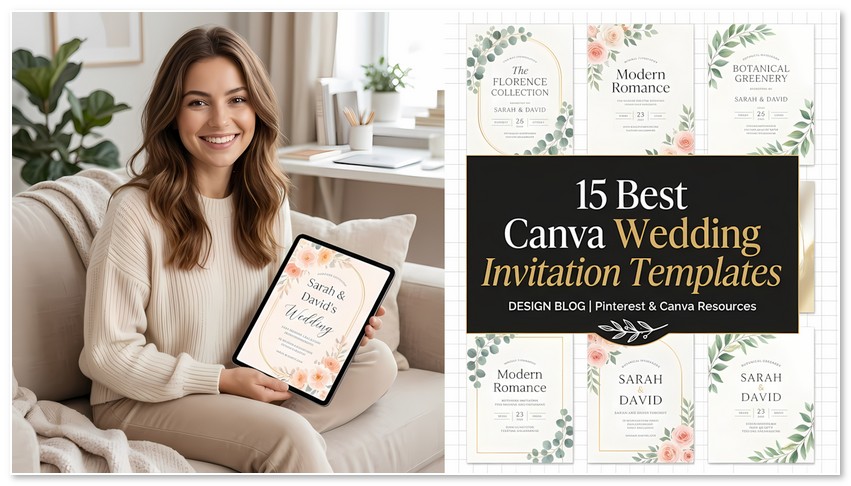
I have spent enough time inside Canva’s editor to know that the template you pick matters less than the template you can actually finish. A floral suite that looks perfect in a preview can fall apart the moment you realize the fonts need a Pro plan, or the RSVP card text won’t fit without shrinking to 8 point.
I picked these fifteen Canva wedding invitation templates from Creative Fabrica with that in mind. Some are complete suites. Some solve one specific problem well, like a save-the-date that matches the invitation without repeating it. A few are worth skipping if you are on a free account, and I say so where the listing suggests it.
The selection criteria were simple: does the listing describe something you can realistically edit in Canva, does the style fill a gap the other fourteen don’t, and does the seller give enough detail to judge whether the template will work for a printed or digital invitation. I did not test these in a Canva account or print them. The descriptions and previews are the evidence, and Canva’s own help documentation is the source for the upload and plan rules.
📁 Quick Navigation: Find Your Best KDP Cover Fonts
Quick Navigation: Jump to Any Template
- 1. Blue Wedding Invitation Suite Canva
- 2. Modern Script Invitation Canva Bd007
- 3. Botanical Invitation Suite Canva Bd011
- 4. Floral Wedding Invitation Suite Canva
- 5. Wedding Invitation Template Canva Tulip
- 6. Minimal Wedding Invitation Card Template
- 7. Beautiful Wedding Invitation Canva
- 8. Save the Date Monoline Rose Canva
- 9. Editable in Canva: Wedding Invitation
- 10. Modern Minimal Invitation Canva Bd010
- 11. Wedding Canva Template by Origin Designs PH
- 12. Mandala Wedding Invitation Template
- 13. Beach Boho Wedding Invitations Bundle
- 14. Watercolor Soft Pink Flowers Wedding Bundle
- 15. Free Wedding Instagram Canva Templates Bundle
My Top Picks
- Best overall: Blue Wedding Invitation Suite Canva. Three coordinated cards, one palette, no guessing whether the RSVP will match.
- Best for a free Canva account: Beautiful Wedding Invitation Canva. The listing mentions free fonts, which usually means no Pro font subscription.
- Best for a garden or outdoor wedding: Botanical Invitation Suite Canva Bd011. Subtle enough that the venue does the talking.
Top 15 Canva Wedding Invitation Templates
1. Blue Wedding Invitation Suite Canva — Best Coordinated Formal Suite
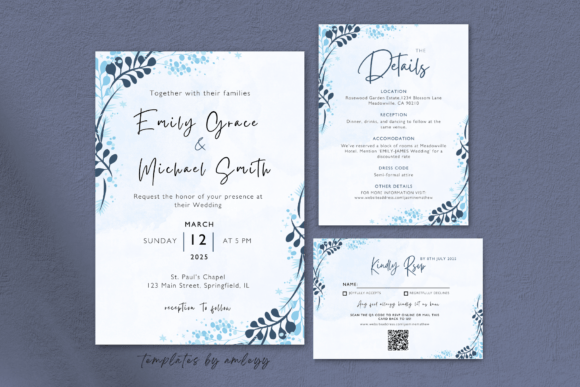
A three-piece suite is the practical choice for anyone who does not want to hunt for a matching RSVP card later. The listing describes soft blue hues and a set that covers the invitation, RSVP, and details card. That structure is the real value here. The design itself is traditional, which is fine if you are planning a church ceremony or a formal reception where the stationery should not compete with the venue.
The limitation is the same one that applies to every suite on this list: the listing does not say whether the fonts are Canva’s built-in library or a custom upload. If they are custom, a free account will substitute something else, and the suite will not look like the preview. Check that before you commit to a print run.
Best for: Couples planning a formal wedding who want the invitation, RSVP, and details card to match without extra sourcing.
Why I like it: The coordinated set removes the most common DIY mistake, which is three cards that look like they came from three different designers.
- Three coordinated cards in one purchase
- Formal palette that suits traditional venues
- Clear structure for a complete invitation suite
2. Modern Script Invitation Canva Bd007 — Best Calligraphy-Led Design
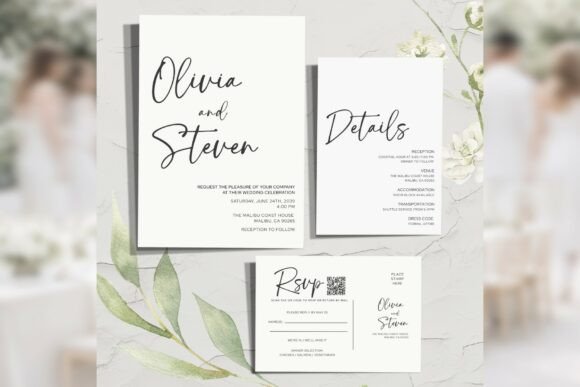
Modern script is a narrow category. Done well, it feels personal and hand-drawn. Done badly, it looks like every other DIY invitation from the last five years. This listing claims “expressive calligraphy” paired with clean, minimal layouts. That pairing is the right instinct. A script with personality needs negative space and a quiet companion typeface, or the card turns into visual noise.
If you choose this template, keep the script for the names and maybe the opening line. Set the venue address, time, and RSVP details in a plain serif. A script that handles “Emma & James” beautifully will fail on “Reception immediately following at the Garden Room.”
Best for: A refined but not overly formal wedding, especially one with a contemporary or editorial feel.
Why I like it: The description suggests restraint in the layout, which is what separates a good script invitation from a cluttered one.
- Script suited to names and short headlines
- Minimal layout described, which supports readability
- Works for modern, non-traditional ceremonies
3. Botanical Invitation Suite Canva Bd011 — Best for Understated Garden Weddings
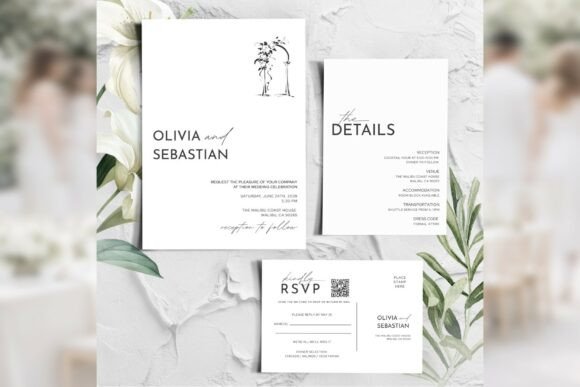
Botanical designs fail when the illustration overwhelms the text. This suite’s description specifies “minimal botanical” and “subtle botanical accents,” which is the right calibration for a garden wedding. The venue provides the visual richness. The stationery should not compete with it.
The typographic claim is “refined typography, clean layouts.” That places this template in the formal-but-not-stiff category. It would suit a daytime garden ceremony or an outdoor venue with a relaxed but intentional aesthetic. It would feel out of place at a black-tie hotel reception, where the botanical motif reads as too casual.
Best for: Garden, backyard, or outdoor weddings where the setting is the main visual event.
Why I like it: Subtle botanical elements are harder to find than lush floral designs, and they photograph better in natural light.
- Minimal botanical accents that do not crowd the text
- Clean typography described for readability
- Suited to outdoor and garden venues
💡 Related: 25 Best Canva Templates for Wedding Planners in 2026
4. Floral Wedding Invitation Suite Canva — Best Watercolor Formality
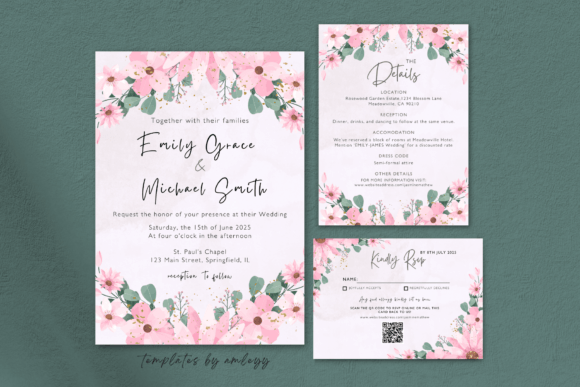
Watercolor floral is the default wedding aesthetic for a reason. It prints predictably, reads as formal without requiring a specific cultural context, and photographs well. This suite includes the invitation, RSVP, and details card, which makes it more practical than a single-file listing.
The problem with watercolor is color accuracy. A soft floral that looks refined on your monitor can print muddy if the paper absorbs too much ink or the printer calibration is off. A printed proof is not optional here. If you are printing at home, test on the actual paper before the full run.
Best for: Spring and summer weddings with a traditional or semi-formal dress code.
Why I like it: The three-card structure means you are not hunting for a matching details card two weeks before the wedding.
- Three coordinated cards in one set
- Watercolor floral suits formal and semi-formal weddings
- Predictable printing compared to highly detailed illustrations
💡 Fastest way to get all 15 templates: All of the templates below are available through Creative Fabrica’s All Access subscription — one plan, unlimited downloads, full commercial license. Start your free trial →
5. Wedding Invitation Template Canva Tulip — Best Pastel Romantic Border
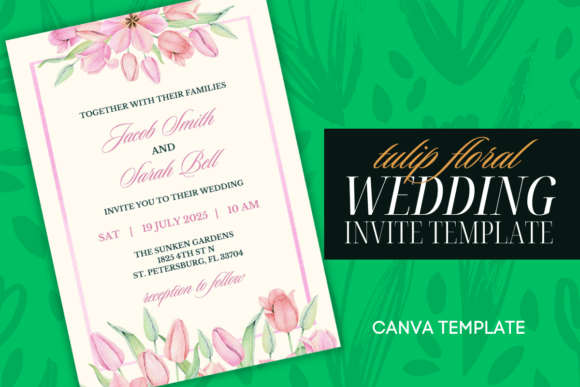
Tulip motifs carry a specific symbolic weight that some couples want and others do not. The seller describes a pink pastel tulip floral border and links the flower to “passion and love.” That is marketplace language, but the practical question is whether the border frames the text without crowding it.
A floral border works best when the invitation wording is short. Long ceremony wording plus a border plus a script font creates a dense card. If your venue name is long or you have multiple host lines, test the layout before committing. This template would feel out of place at a minimalist or modern wedding. The border is decorative by definition.
Best for: Romantic, pastel-themed weddings where a floral frame suits the overall design.
Why I like it: The tulip motif is more specific than generic roses, which makes the invitation feel chosen rather than defaulted.
- Distinct tulip border rather than generic floral
- Pastel palette suits spring celebrations
- Easy to edit and customize, per the listing
6. Minimal Wedding Invitation Card Template — Best Readability at Small Sizes
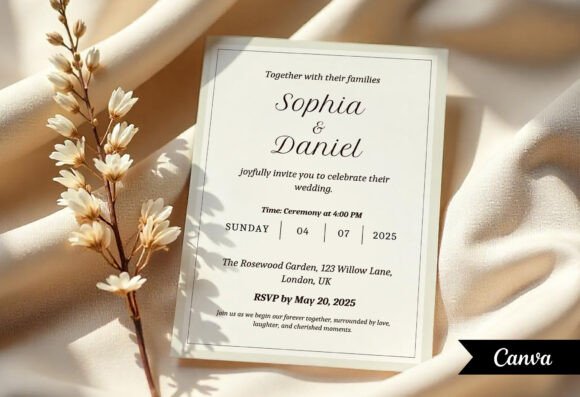
This is the least glamorous template on the list, and that is exactly why it belongs here. A 5×7 minimal card with “no design experience needed” solves the problem that decorative suites create: small text that guests cannot read. RSVP instructions, accommodation details, and website URLs all live at 9 or 10 point. A minimal layout gives that text room.
The listing does not promise layered files or specific fonts. It promises a clean, customizable card. For a details card inside a larger suite, or a standalone invitation for a casual celebration, that is enough. Pair it with a more decorative invitation and keep the logistics readable.
Best for: The details card in a larger suite, or a standalone invitation for a relaxed celebration.
Why I like it: It prioritizes the part of the invitation that guests actually need to read.
- Clean layout supports small text readability
- 5×7 format fits standard envelopes
- No design experience required, per the listing
7. Beautiful Wedding Invitation Canva — Best for Free-Font Customization
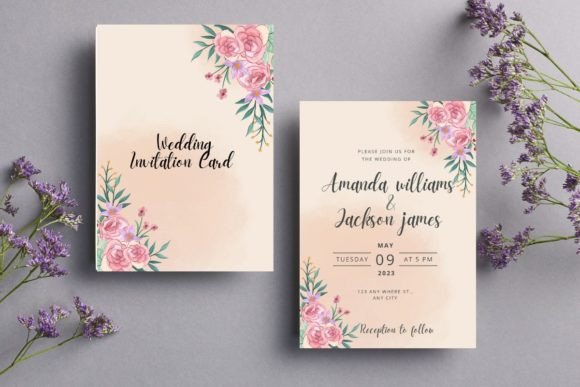
The key phrase in this listing is “free fonts for easy customization.” If the template relies on Canva’s built-in font library rather than a custom upload, a Canva Free user can edit it without hitting the Brand Kit wall. That is not a guarantee, but it is a stronger signal than most listings provide.
The second useful detail is “texts, images, and graphics on separate layers.” Layered files give you control that flattened designs do not. You can move the monogram, swap the floral element, or change the background without affecting the text. The trade-off is that layered files are easier to break. Save a duplicate before editing.
Best for: Canva Free users who want a customizable template without upgrading for font uploads.
Why I like it: The combination of free fonts and separate layers is rare in this price range.
- Listing mentions free fonts, suggesting Canva Free compatibility
- Separate layers for text, images, and graphics
- Luxury aesthetic without a Pro font requirement
8. Save the Date Monoline Rose Canva — Best Coordinated Pre-Wedding Stationery
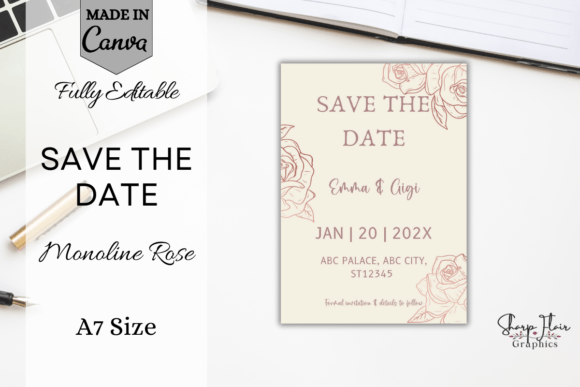
Save-the-dates and invitations serve different functions. The save-the-date goes out earlier, often to a wider list, and carries less information. A monoline rose gold design gives you a visual system that can extend from the save-the-date to the invitation without repeating the same layout.
The listing describes a chic, modern, romantic aesthetic. That is broad enough to fit several wedding styles. The practical advantage is coordination. If the save-the-date and invitation share a design language, guests recognize the wedding before they open the envelope.
Best for: Couples sending save-the-dates months before the invitation and wanting a visual system that carries through.
Why I like it: Rose gold is warm enough to avoid the coldness of silver but less traditional than yellow gold.
- Coordinated save-the-date and invitation design
- Monoline rose gold suits modern and romantic themes
- Extends the visual system across pre-wedding mail
Like these picks? They’re all included with Creative Fabrica All Access — rated 4.8/5 from 590+ reviews.
9. Editable in Canva: Wedding Invitation — Best for Commercial Use
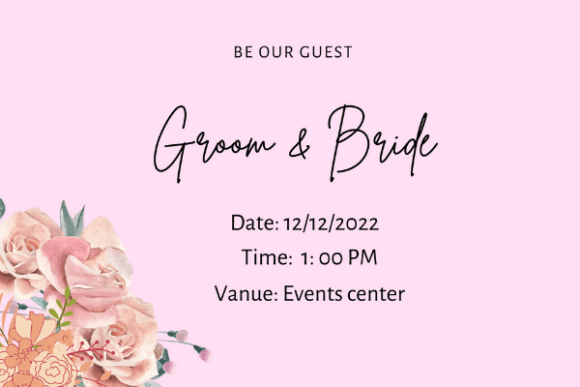
The listing mentions a commercial license and high-resolution files for print or digital use. That combination matters if you are a planner producing invitations for clients, or if you want to sell stationery on a small scale. Most marketplace templates are personal-use only. A commercial license changes who can use the file and how.
The design itself is described as professional and easy to edit. That is not distinctive, but the license is. If your work involves client weddings or resale, verify the license terms on the product page before relying on this listing. Creative Fabrica’s subscription license allows commercial use for designs created while the subscription is active, but the rules differ between subscription downloads and single purchases.
Best for: Wedding planners, designers, or anyone producing invitations for clients or resale.
Why I like it: The commercial license is the differentiator, not the design.
- Commercial license mentioned in the listing
- High-resolution files for print or digital delivery
- Suited to client work and small-scale resale
10. Modern Minimal Invitation Canva Bd010 — Best Contemporary City Wedding
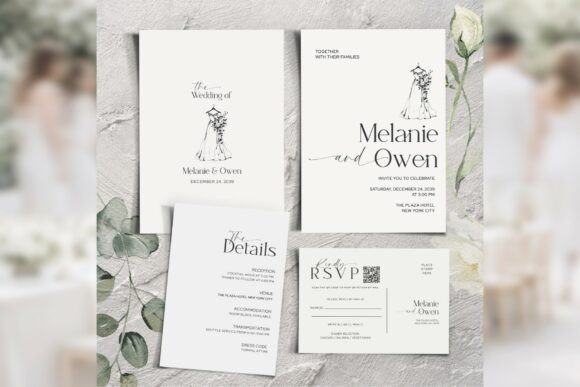
Minimal design is harder than decorative design because there is nowhere to hide. A script font can distract from weak layout decisions. A minimal suite cannot. This listing claims refined typography, clean layouts, and effortless Canva customization. That suggests the design relies on proportion and spacing rather than ornament.
It would suit city weddings, restaurant receptions, or any celebration where the aesthetic leans toward clean lines. It would also work for a wedding website header or a digital invitation. The limitation is flexibility. If you want a design that feels uniquely yours through visual details, this template’s strength becomes a constraint.
Best for: Contemporary city weddings, restaurant receptions, and digital invitations.
Why I like it: Minimal suites are harder to find than floral ones, and they photograph well without depending on illustration.
- Refined typography and clean layouts
- Suited to modern, urban venues
- Works for print and digital formats
11. Wedding Canva Template by Origin Designs PH — Best Comprehensive Bundle
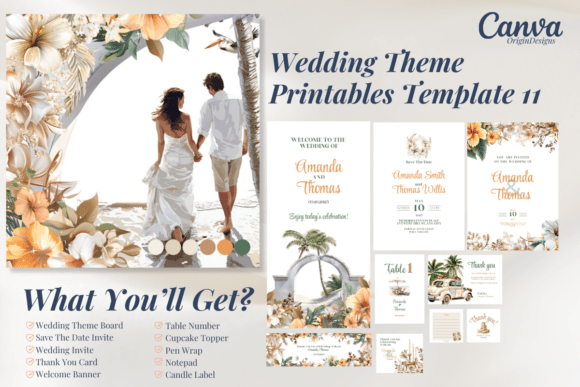
The listing calls this a comprehensive wedding Canva template bundle, aimed at couples planning a wedding or designers customizing for clients. The breadth is the selling point. One purchase covers more of the stationery suite than a single invitation template would.
Bundles are not automatically better. A seating chart and a place card do not need the same typographic treatment as an invitation. If you use this bundle, decide which pieces need the full design treatment and which should be simplified for readability. A comprehensive set gives you options, but it also gives you more decisions to make.
Best for: Planners and design businesses that need multiple stationery pieces from one design system.
Why I like it: The bundle approach saves sourcing time if you need more than an invitation and RSVP.
- Comprehensive bundle for planning or client work
- Covers more stationery pieces than a single template
- Suited to designers customizing for clients
12. Mandala Wedding Invitation Template — Best Ornate and Cultural Design
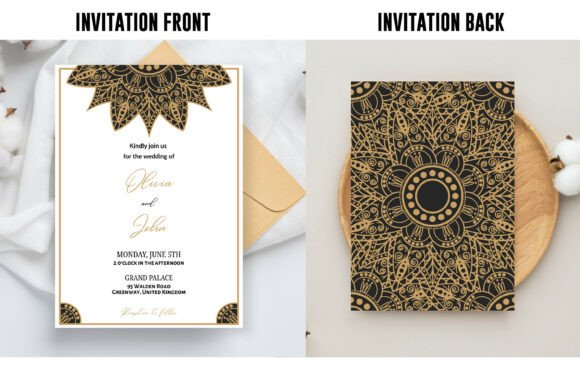
Mandala motifs carry cultural and spiritual associations that a generic floral template does not. The listing specifies a 5×7 template with a high-quality 300 DPI JPG backside included. That detail matters: the backside is a JPG, not an editable Canva element. You can customize the front in Canva, but the back is a fixed image.
This template suits weddings with South Asian, Buddhist, or bohemian influences, or any celebration where intricate geometric ornament fits the aesthetic. It would feel out of place at a minimal or modern wedding. Mandala patterns are dense, so pair them with a simple, readable typeface for all logistical text.
Best for: Weddings with cultural or bohemian influences where ornate geometric patterns suit the ceremony.
Why I like it: The mandala motif is culturally specific rather than generic, which makes it a meaningful choice for the right wedding.
- Intricate mandala design for ornate aesthetics
- 5×7 format with 300 DPI JPG backside
- Fully editable in Canva on the front, per the listing
13. Beach Boho Wedding Invitations Bundle — Best Destination Wedding Set
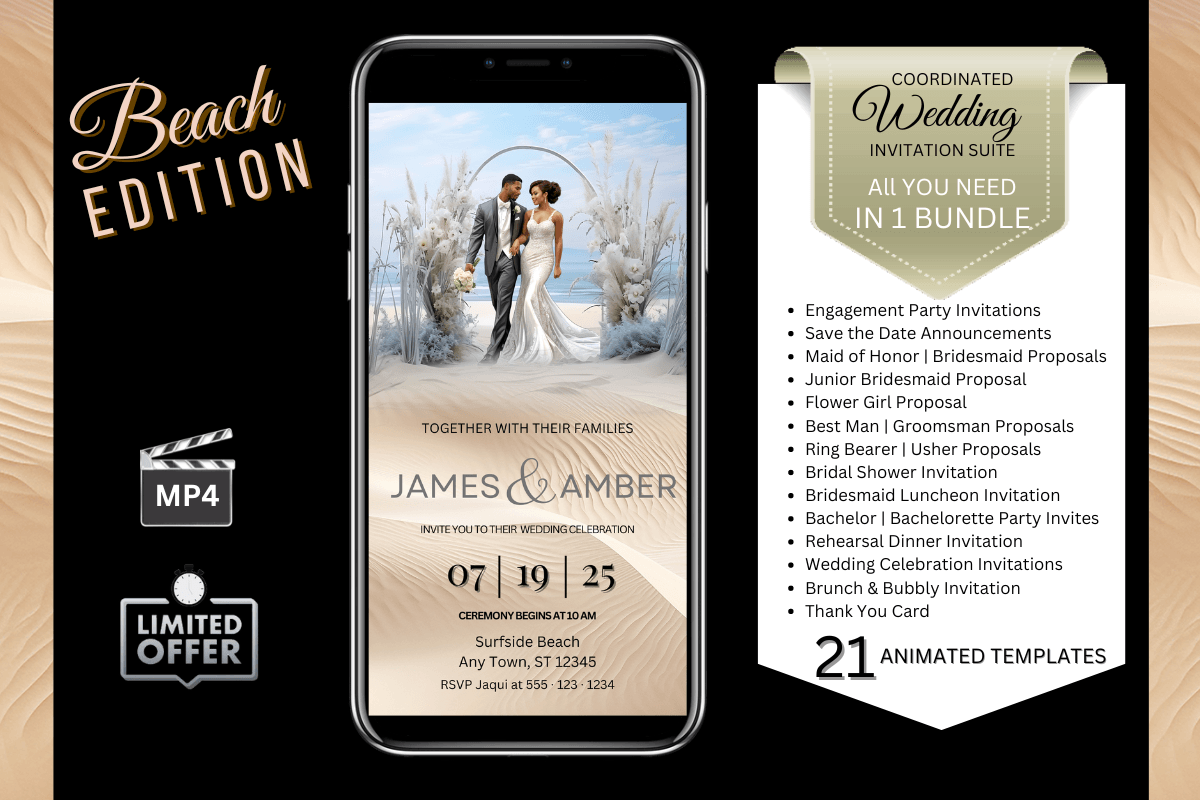
Boho typography works when it feels relaxed without feeling careless. This bundle targets beach, rustic, and outdoor weddings, where formal convention would be a mismatch. The listing specifies editable Canva templates, which is the minimum you should expect from any product on this platform.
Beach designs often use lighter font weights that can disappear in bright outdoor lighting if the invitation is displayed or photographed. Print a proof and view it in direct sun before approving the full run. This bundle would feel wrong for a formal hotel ballroom or a black-tie city wedding. The invitation’s tone should match the event’s formality.
Best for: Destination weddings, beach ceremonies, and outdoor celebrations with a relaxed dress code.
Why I like it: The bundle targets a specific aesthetic rather than trying to be everything to everyone.
- Beach boho styling suited to outdoor venues
- Editable Canva templates included
- Bundle format covers more than one piece
14. Watercolor Soft Pink Flowers Wedding Bundle — Best Cohesive Romantic Suite
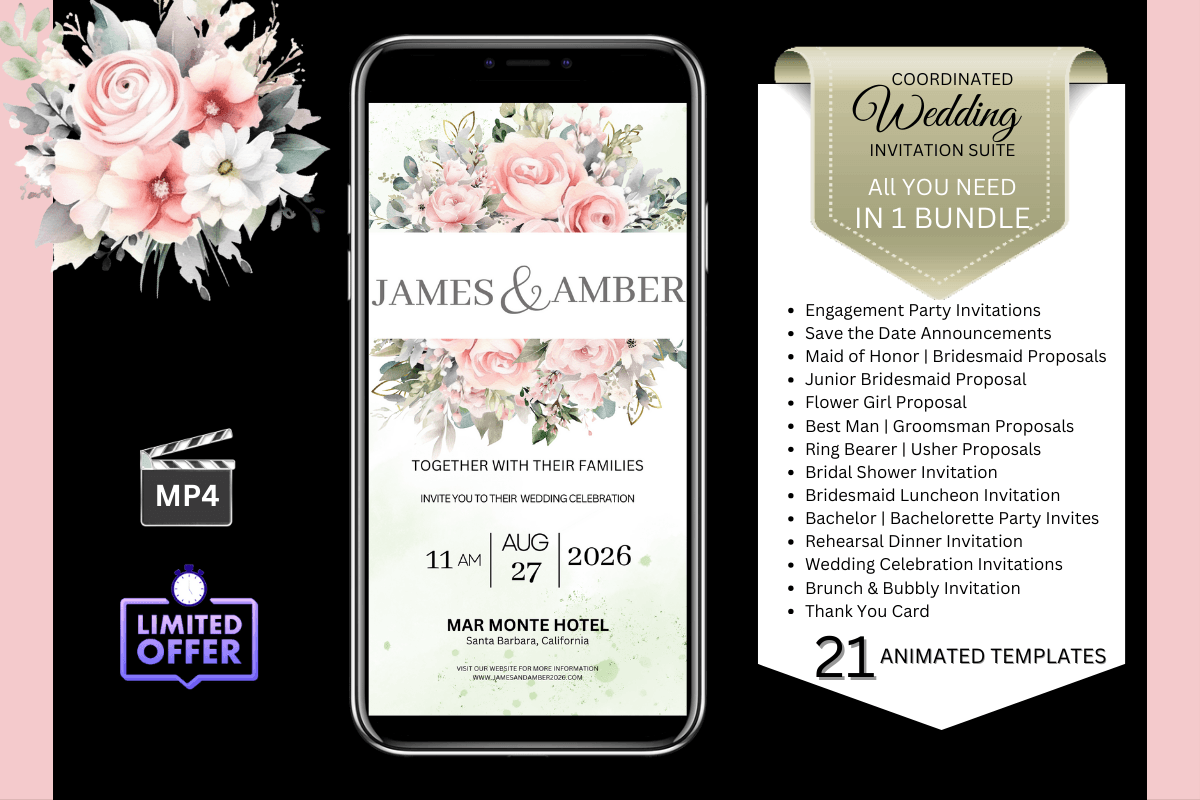
The practical advantage of a bundle is matching cards. This listing specifies watercolor soft pink flowers with matching RSVP and details cards. Matching fonts across cards is straightforward when they ship together. Matching them across three separate purchases is where most DIY suites go wrong.
The typographic character is soft, romantic, and approachable rather than formal or dramatic. It suits handwritten-style headlines and gentle supporting text. The limitation is trend sensitivity. A pastel watercolor aesthetic that feels fresh in 2026 may read as dated in a decade. If timelessness matters more than current style, a neutral serif suite is the safer choice.
Best for: Romantic pastel weddings where a cohesive, soft aesthetic matters more than a formal one.
Why I like it: The matching RSVP and details cards remove the sourcing step that derails most DIY suites.
- Matching RSVP and details cards included
- Soft pink watercolor suits romantic themes
- Cohesive look without extra sourcing
15. Free Wedding Instagram Canva Templates Bundle — Best for Bridal Brands
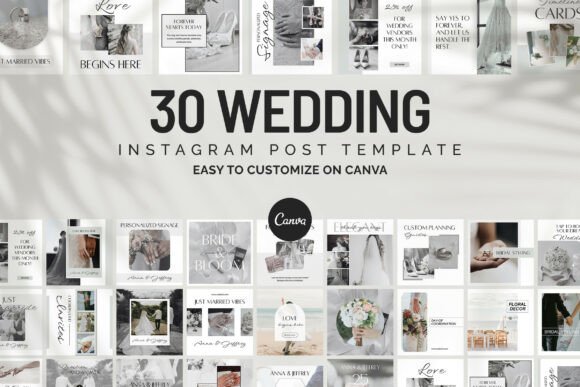
This is not a wedding invitation. It is a social media set for the people who sell to weddings: bridal brands, planners, and venues. The listing specifies 30 editable Instagram templates for cohesive social media content. If you are a couple planning a wedding, skip this one. If you run a wedding-adjacent business, the value is consistency across a feed rather than a single polished card.
The word “free” in the title requires a caveat. The templates are free to edit in Canva, but some Canva templates include Pro elements that require a subscription to export without watermarks. Check before building a content calendar around them. The listing does not specify whether Pro elements are included.
Best for: Bridal brands, wedding planners, and venues that need cohesive Instagram content.
Why I like it: Thirty templates in one bundle solves the consistency problem that most small wedding businesses have on social media.
- 30 editable Instagram templates
- Suited to bridal brands, planners, and venues
- Cohesive social media content in one bundle
🎁 Claim Your First 10 Asset Packs for Free Want to test-drive these designs before committing? Creative Fabrica offers a risk-free trial that includes 10 free downloads—more than enough to instantly grab 2–3 of the complete templates from this guide (like the Floral Wedding Invitation Suite Canva, Beautiful Wedding Invitation Canva or the Save the Date Monoline Rose Canva) without paying anything upfront. You can cancel anytime. Activate Your 10 Free Downloads Trial →
🎨 Bonus: A Canva Course That Walks You Through the Whole Process
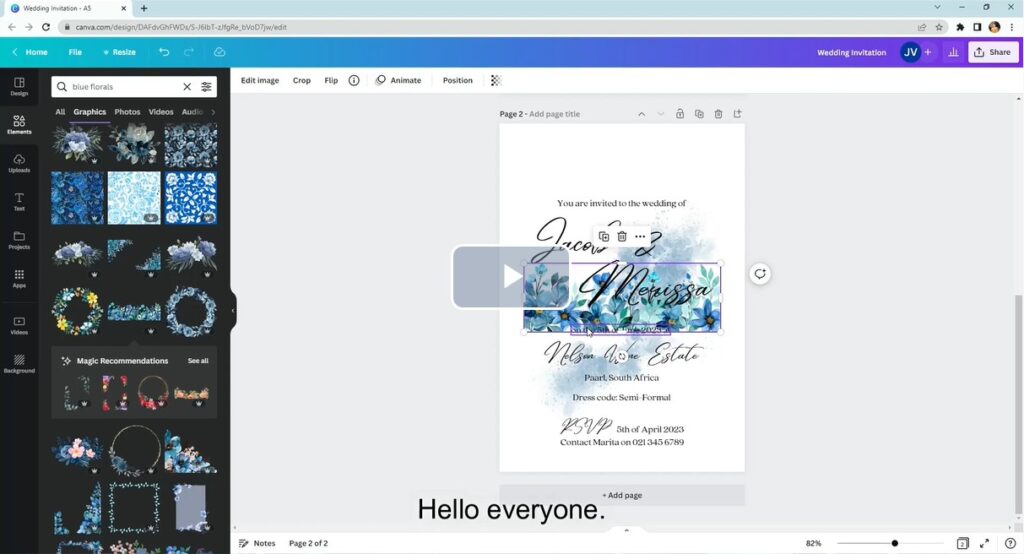
If the templates above solve the design problem but you still feel unsure about the editing itself, there is a course worth mentioning. “Designing and Making Wedding Invitations with Canva” is taught by Jana-Mari from JM Things, and it holds a 5.0 rating across 13 reviews. The review count is small, so treat the rating as a signal rather than proof, but the curriculum covers exactly what most couples get stuck on.
The course starts with opening a design in Canva, which sounds trivial until you are staring at a template wondering which layer you are supposed to click. From there it walks through what actually belongs in a wedding invitation, then shows how to add text and graphics so the finished card matches the wedding’s theme instead of looking like a template with names dropped into it. That last part is the gap most tutorials skip: knowing which elements to change and which to leave alone.
It is not a substitute for choosing the right template. But if you have picked one from this list and want a structured walkthrough before you start editing, this course covers the steps in order.
The course is paid, so check the current price on the class page before enrolling.
How to Choose the Right Canva Wedding Invitation Template
Check Your Canva Plan Before You Fall in Love With a Template
Canva Free users can edit templates, but custom font uploads require a paid plan with Brand Kit access. Only Brand Kit admins and owners can upload fonts, and the font must be licensed for embedding. If a Creative Fabrica listing says “fully editable in Canva” but uses a custom font, a free account will substitute a different typeface. The invitation will not look like the preview.
Look for listings that mention “free fonts” or “Canva library fonts” if you are on a free plan. The Beautiful Wedding Invitation Canva listing is the clearest example in this roundup.
Match the Suite to the Wedding, Not the Other Way Around
A black-tie reception calls for refined serifs or restrained florals. A backyard celebration calls for warmer, more casual design. The most common mistake is choosing a template because it looks good in a marketplace preview, then discovering it clashes with the venue, the florals, or the overall palette.
Start with three adjectives that describe the wedding. If those words are “formal, timeless, elegant,” a beach boho script is wrong regardless of how well it photographs. If they are “relaxed, outdoor, intimate,” a copperplate-inspired suite will feel borrowed.
Read the Listing for What “Editable” Actually Means
A listing that says “fully editable” usually means the text boxes are editable. It does not always mean the colors are global document colors, the graphics are separate layers, or the fonts are available to free users. The Beautiful Wedding Invitation Canva listing mentions separate layers for texts, images, and graphics. That is a useful detail. Most listings do not provide it.
If the listing is vague, assume the minimum: text is editable, everything else is fixed. If that is not enough for your design, look for a listing that specifies layers or global colors.
Print a Proof Before the Full Run
Screen previews lie about how fine strokes, light weights, and small text will render on paper. A watercolor floral that looks refined on a monitor can print muddy. A minimal layout that reads well on a phone can look sparse on a 5×7 card. The only way to know is to print one.
If you are printing at home, test on the actual paper before the full run. If you are using a print shop, request a proof. The cost of one proof is lower than reprinting fifty invitations.
Verify the License If You Are Selling or Designing for Clients
Most marketplace templates are personal-use only. If you are a planner producing invitations for clients, or you want to sell stationery, you need a commercial license. Creative Fabrica’s subscription license allows commercial use for designs created while the subscription is active, but the rules differ between subscription downloads and single purchases. Check the specific listing before relying on it for client work.
Where These Templates Work Best
The template is one piece of the stationery system. These fifteen cover the main use cases, but the same template can serve different purposes depending on how you use it.
The Main Invitation Card
The invitation card carries the names, date, and venue. It is the piece guests keep. This is where a script font or a statement layout belongs. The Modern Script Invitation Canva Bd007 and the Floral Wedding Invitation Suite Canva both work here.
The RSVP and Details Card
The details card carries the information guests need to act: RSVP instructions, accommodation blocks, dress code, and directions. Readability matters more here than anywhere else. The Minimal Wedding Invitation Card Template is the safest choice for this piece, even if you use a more decorative invitation.
Save-the-Dates and Pre-Wedding Mail
Save-the-dates go out earlier and carry less information. They set the visual tone for everything that follows. The Save the Date Monoline Rose Canva works as a standalone piece or as the start of a coordinated system that extends to the invitation.
Digital and Social Announcements
Not every wedding needs a printed suite. A digital invitation or a social announcement can use the same template with a different export size. The Free Wedding Instagram Canva Templates Bundle is for vendors, not couples, but the principle applies: one design system, multiple formats.
💬 FREQUENTLY ASKED QUESTIONS
Can I use these Canva wedding invitation templates on a free account?
Some of them, yes. Canva Free users can open and edit templates, but templates that include Pro elements may require a subscription to export without watermarks. Templates that rely on custom fonts require a paid plan with Brand Kit access for the font upload. Check the individual listing for font and element details before designing around a template.
Do these templates include the fonts shown in the preview?
Not always. Some listings use Canva’s built-in font library, which is available to all users. Others use custom fonts that require a paid Canva plan and a font upload. The listing usually says if the fonts are free or included. If it does not, assume the fonts may need a Pro plan.
Can I sell invitations made with these templates?
It depends on the license. Creative Fabrica’s subscription license allows commercial use for designs created while the subscription is active. Single purchases have different terms. If you are selling invitations, check the license on the specific product page before using it for client work or resale.
What is the difference between a Canva template and a Canva font upload?
A Canva template is a design file you open in Canva and edit. A font upload is a separate process that adds a typeface to your Brand Kit. Templates can use fonts that are already in Canva, or they can require you to upload a custom font. The two are related but distinct. A template can be editable without requiring a font upload.
How many templates do I need for a full wedding suite?
At minimum, three: the invitation, the RSVP card, and the details card. Some suites include all three in one purchase. Others sell them separately. A coordinated bundle saves sourcing time and ensures the typography and palette match across cards.
Are these templates print-ready?
They are editable in Canva, which means you can export them as PDFs for print. But “print-ready” depends on the paper, the printer, and the color calibration. Always print a proof before the full run, especially for watercolor designs or light font weights.
Final Thoughts on Choosing Canva Wedding Invitation Templates
The template that works is the one you can actually finish. A coordinated suite saves sourcing time. A minimal details card saves readability. A commercial license saves a legal headache if you are designing for clients. None of these are glamorous decisions, but they are the ones that determine whether the invitation arrives looking like the preview.
If you are on a free Canva account, start with the Beautiful Wedding Invitation Canva. If you want a complete formal suite, the Blue Wedding Invitation Suite Canva is the safest bet. If you are planning a garden wedding and want the stationery to stay out of the venue’s way, the Botanical Invitation Suite Canva Bd011 is the one I would pick.
And if the template uses a font you love but cannot upload on your plan, choose a different template. The font is not worth upgrading for unless you plan to design more than one wedding.
📚 Related Guides:
- 30 Profitable KDP Niches 2026: Planners, Journals & Trackers That Sell — Find your next winning niche before you design a single page.
- How to Create and Sell KDP Coloring Books Fast Using Creative Fabrica Assets (2026 Guide) — A faster path into one of KDP’s most consistent low-content categories.
- 15+ Best KDP Planner Templates on Creative Fabrica for Commercial Use (2026 Master Collections) — Ready-made interiors with full commercial licensing, so you can publish without redesigning from scratch.
Disclaimer: AppsReviewsHUB.com participates in affiliate programs and may earn a commission on purchases made through our links, at no extra cost to you.